
← Back to modules

nexya performance WordPress query monitor

What each page costs the site, and the settings that lighten it: a query monitor on every page, options loaded on each visit, the Heartbeat, revisions

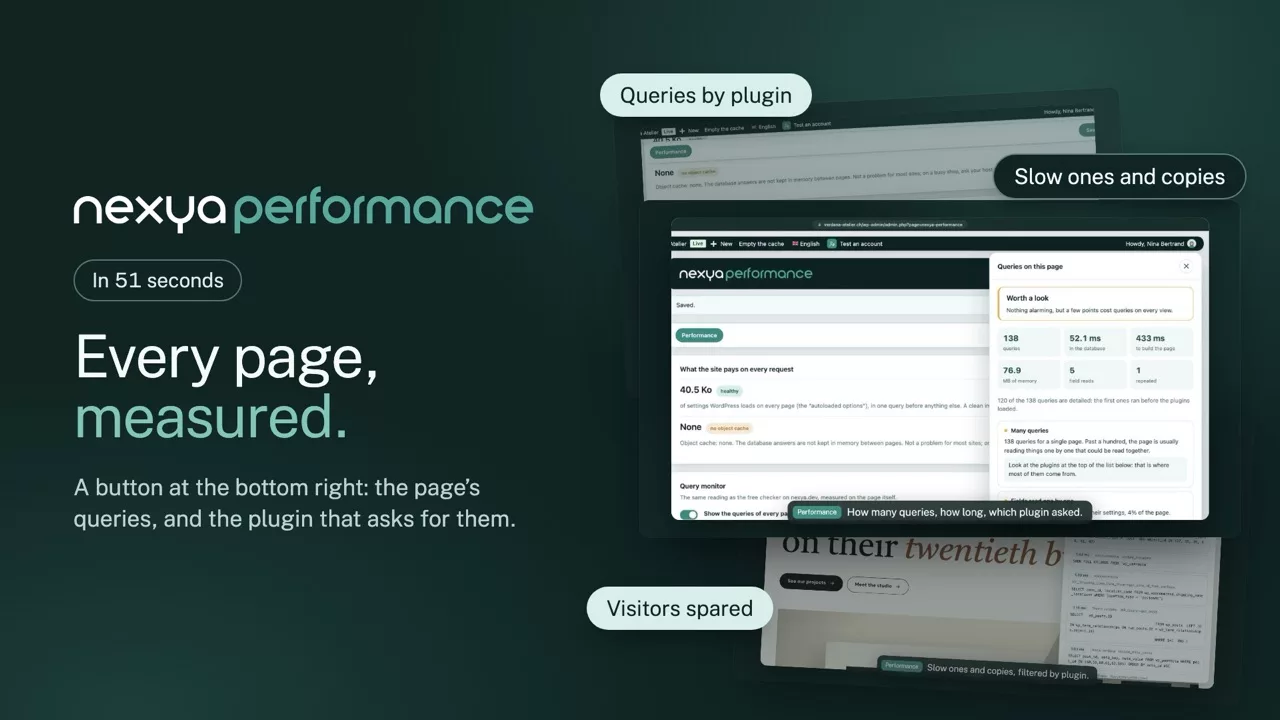
  • The queries of each page A small button at the bottom right, on the site as well as in the administration: how many queries, which extension requested them, and, with Pro, how long each one took
  • What weighs things down, named Duplicate queries, fields read one by one, options read separately and, with Pro, slow ones: each with a trail to fix it
  • The weight of each visit Options loaded with every query, measured and compared to a clean installation; with Pro, sorting to flush out those no longer in use
  • Settings that lighten Spaced Heartbeat outside the editor, removed attachment pages, limited revisions: each can be toggled individually
  • Nothing for visitors The monitor only runs for logged-in administrators and reads queries as they pass, without changing how WordPress runs: visitors do not pay for an extra query
nexya performance on video: WordPress query monitor 0:51

What it can do

See the queries behind every WordPress page, and lighten the site

A slow site is rarely the server’s fault: it is the extra queries, the options loaded on every visit and a few default settings. The monitor shows them, page by page, with the plugin responsible.

The query monitor

How many queries, and who asked for them

A small button at the bottom right, on the site and in the admin, opens the page’s list of queries, grouped by plugin or theme. Duplicates, fields read one at a time and options read separately are named, each with a hint to fix it.

  • With Pro, each query’s duration and the slow ones
  • Visible only to logged-in admins
  • No extra query for visitors
The page’s queries, in one click nexya performance
To watch Nothing alarming, but a few points cost queries on every view.
148
queries
61,2 ms
in the database
12
repeated

By plugin

  • woocommerce 67 queries
  • nexya 31 queries
  • WordPress 28 queries
  • Theme 22 queries
52,4 ms SELECT * FROM wp_posts WHERE … ORDER BY meta_value
3 times SELECT option_value FROM wp_options WHERE option_name = …

Autoloaded options

The weight every visit drags along unknowingly

On every visit WordPress reads a list of options, even those left behind by a deleted plugin or an old theme. The module measures their weight and compares it with a clean install; with Pro, you move out or delete the unused ones, value backed up.

  • Compared with a clean install
  • The originating plugin named
  • Value backed up before any sorting
Options loaded on every visit nexya performance
Option Size
old_plugin_cache Deleted plugin 412 Ko
theme_mods_ancien Old theme 96 Ko
rewrite_rules WordPress 38 Ko
cron WordPress 12 Ko

With Pro, unused ones are taken out of autoload, with their value backed up.

Settings

Three WordPress defaults, fixed

Heartbeat pings the server every few seconds, each attachment has an empty indexable page, and revisions pile up without limit. Each of these settings is fixed with a switch, without changing how the editor works.

  • Autosave kept in the editor
  • No more empty pages offered to Google
  • A database that no longer swells
Settings that lighten the load nexya performance
  • Heartbeat slowedOutside the editor
  • Attachment pagesRemoved, redirected to the file
  • Revisions limitedFive per content

Each setting is switched on separately, and undone just as easily.

And everything else, already included

  • Options loaded on every visit Their weight, compared with a clean install.
  • Options sorting With Pro, move out or delete unused ones, value backed up.
  • Heartbeat slowed Fewer server calls outside the editor.
  • Revisions limited A maximum per content, so the database does not swell.
  • Attachment pages Removed, so Google no longer gets empty pages.
  • Online check The nexya.dev SQL checker reads a plugin’s queries.

See what the page requests

A slow WordPress page is rarely slow because of just one thing. It’s dozens of small queries: a field read separately, an option that isn’t preloaded, the same question asked twice by two extensions. The monitor shows them right on the page, with the name of the one that triggered them.

What the monitor detects

The number of queries, memory, duplicate queries, fields read one by one, options read individually, and searches on a field’s value. With Pro, the time for each query is added, and those exceeding 50 ms are flagged. Each point comes with a trail to fix it, and the complete list can be filtered by extension.

Nothing for visitors

Recording only starts for a logged-in browser, and stops immediately for anyone who isn’t an administrator. Visitors don’t pay for an extra query, and the monitor turns off with a click once the site is tuned.

Free

Query monitor on every page, weight of autoloaded options, spaced Heartbeat, removed attachment pages, limited revisions

Pro

Sorting autoloaded options: remove or delete those no longer in use, with a backup of their value

Get started

nexya performance in three steps

  1. Install nexya From nexya.dev, like any WordPress plugin.
  2. Turn on nexya performance A switch in the hub. When turned off, the module loads nothing.
  3. Configure, it's ready Default settings suit most sites.

nexya performance is in the free extension, on as many sites as you want.

FAQ

Everything about nexya performance

The query monitor groups each page’s queries by plugin and theme. The one running the most, or the slowest with Pro, shows at the top.

Settings WordPress reads on every visit, even when the page does not need them. The module measures their weight; with Pro, you move out the unused ones.

No. It only shows to logged-in administrators and costs visitors no extra query.

Not entirely: it handles autosave in the editor. The module slows it elsewhere, which removes needless calls to the server.

Query Monitor shows everything, for developers. Here, queries are explained in plain words with a hint to fix them, and the settings that lighten the site are in the same place.

The suite

Other modules