← Back to modules

nexya security WordPress security: HTTP headers and monitoring

Setting up HTTP security headers without breaking the site, monitoring vulnerabilities in active WordPress extensions, and tracking file changes

  • A CSP you can actually enable With Pro, detection mode listens to what the browser blocks and turns each block into a source you can authorize with a single click. Implementing a strict policy is no longer an afternoon of trial and error
  • Notified when an extension becomes dangerous Active extensions are compared against a public vulnerability database, and the admin panel alerts you to the affected one. With Pro, the check runs every night: when a critical vulnerability comes out, you learn about it without having to check
  • Files, compared with the original Every day, the core files and those of plugins from wordpress.org are checked against the originals of their version, and a PHP file hidden in the media folder is flagged. With Pro, the original comes back or the suspicious file is set aside in one click, a copy kept each time.
  • Headers right down to the .htaccess On Apache, headers are also written to the site's .htaccess: even a page served from a cache carries them. On nginx, the screen provides the ones to add to the server configuration
  • A login that holds up Failed attempts block for increasingly longer periods, and the legitimate owner unblocks their account via a link received by email. In Pro, a two-step code for selected roles.
nexya security on video: WordPress security: HTTP headers and monitoring 1:04

What it can do

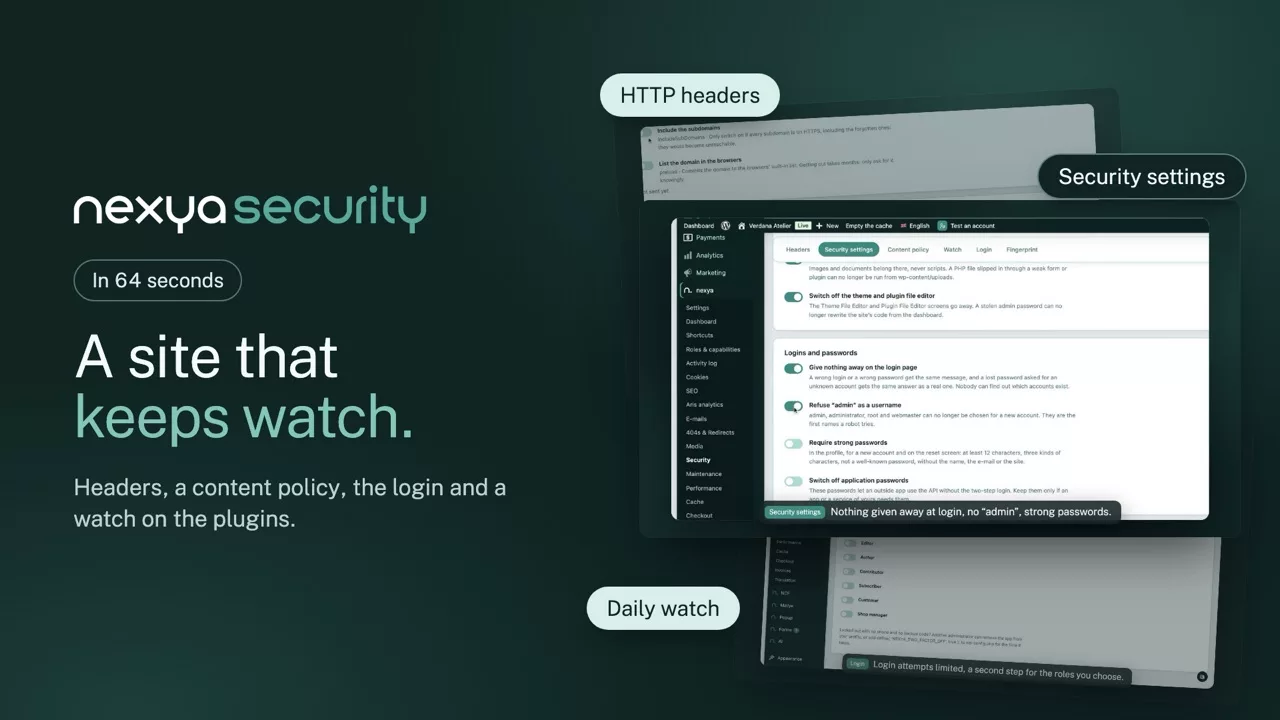
WordPress security: HTTP headers, plugin vulnerabilities and watched files

Not another firewall slowing every page, but what is most often missing: the headers browsers expect, an alert when a plugin becomes dangerous, and files compared with their original.

HTTP headers

Security headers set without breaking the site

HSTS, X-Frame-Options, Referrer-Policy, Permissions-Policy: each one is switched on separately, with a plain explanation. On Apache they are also written to .htaccess, so a cached page carries them; on nginx, the screen gives the lines to add.

  • Watch on vulnerabilities in active plugins
  • Core files compared daily with the originals
  • Protected login, unlock by e-mail
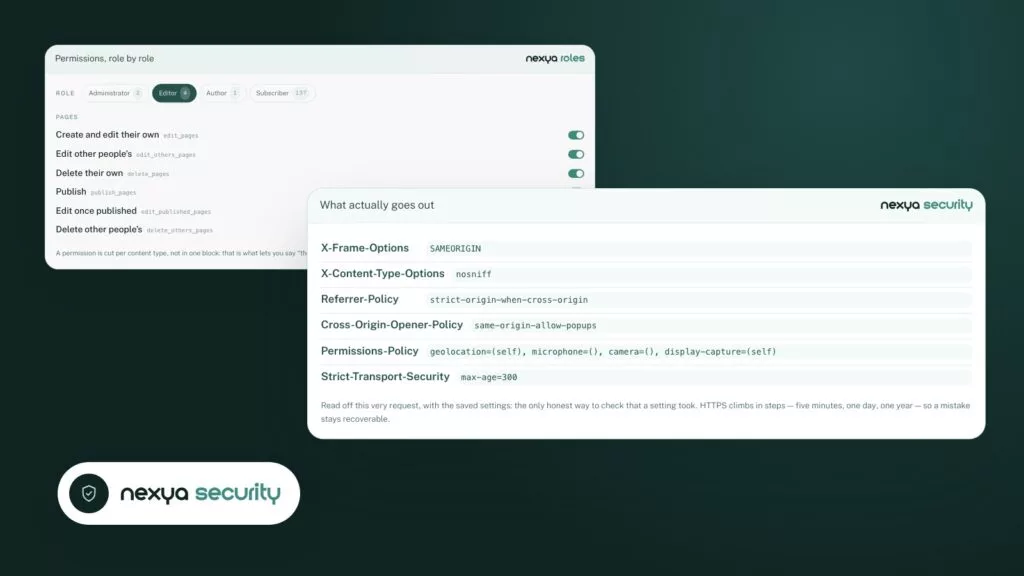
What actually goes out nexya security
  • X-Frame-Options SAMEORIGIN
  • X-Content-Type-Options nosniff
  • Referrer-Policy strict-origin-when-cross-origin
  • Cross-Origin-Opener-Policy same-origin-allow-popups
  • Permissions-Policy geolocation=(self), microphone=(), camera=(), display-capture=(self)
  • Strict-Transport-Security max-age=300

Read off this very request, with the saved settings: the only honest way to check that a setting took. HTTPS climbs in steps — five minutes, one day, one year — so a mistake stays recoverable.
Content Security Policy

A strict CSP, built from what the site actually loads

With Pro, detection mode listens to what the browser would block, without blocking anything yet, and turns each block into an origin to allow in one click. Setting a strict policy stops being an afternoon of trial and error.

  • Automatic nightly scan with Pro
  • Original restored or suspicious file set aside
  • Two-step login for chosen roles
The allowed origins nexya security
Google Fonts (styles) https://fonts.googleapis.com
Google Fonts (fichiers) https://fonts.gstatic.com
Google Maps https://maps.googleapis.com
YouTube https://www.youtube.com

What is not written here is not loaded. One origin per line, with the places it is allowed to appear.

File integrity

A modified or hidden file spotted the next day

Every day, core files and plugins from wordpress.org are compared with their version’s originals, and a PHP file hidden in the uploads folder is flagged. With Pro, the original is restored or the suspicious file set aside in one click, with a copy kept each time.

  • Core and wordpress.org plugins
  • PHP hidden in uploads flagged
  • With Pro, automatic nightly scan
Files, compared with the original nexya security
File Status
wp-includes/version.php Original
wp-admin/index.php Original
plugins/contact/send.php Modified
uploads/2026/04/image.php PHP in uploads

Every day, core and wordpress.org plugins are checked against their version’s originals.

Security settings

The most-tried doors, closed with a switch

Block PHP in the uploads folder, switch off the file editor and XML-RPC, hide the WordPress version, give the same message for every failed login, refuse “admin” and require strong passwords: each setting turns on by itself, with what it changes explained plainly.

  • .htaccess rule written for you on Apache
  • Lost password says nothing for an unknown account
  • Everything stays off until you turn it on
Security settings nexya security

Files

Logins and passwords

Old entry points

The small settings that close the most-tried doors, one switch each, without a firewall slowing the pages down.

And everything else, already included

  • PHP hidden in uploads An executable file in the images folder is flagged.
  • Failed attempts slowed Each failure blocks a little longer.
  • Copy kept Before each repair, the original file is saved.
  • Flagged in the admin An active plugin hit by a known flaw is named.
  • Updates recognised A plugin updated through WordPress is no longer reported as changed.
  • Allow them all A list of known files accepted in one click.

No external platform to run

Everything happens between the site and three public sources: the WordPress.org checksum API for core files, its official repository to restore them with Pro, and a public vulnerability database for monitoring. Nothing passes through a service owned by us, there are no accounts to create, and the results are kept on the site.

Detection mode in practice

With Pro, you enable the listening policy, browse normally for a few days, and each blocked resource shows up in a list. A Google map, a remote font, a video player: you just need to authorize what is legitimate. After a few days, the list dries up, and the policy can be enforced without breaking anything.

What it is not

It is not a firewall. It does not block IP addresses, does not filter incoming requests, and does not replace Wordfence or your host’s equivalent. It covers what most sites lack entirely: proper headers, monitoring that warns you, and the certainty that your files are what they should be.

Free

Headers set by hand, vulnerability watch and alert, core and plugin files compared with the originals every day, PHP hidden in the media folder spotted, protected login with unlock by e-mail, security settings: PHP blocked in the uploads folder, file editor and XML-RPC switched off, version hidden, strong passwords

Pro

Automatic scan, CSP report mode, file fingerprint and rollback, original put back or suspicious file set aside in one click, two-step login

On the blog

Our guides: WordPress security

Guides · 5 min read

Hacked WordPress site: steps to clean it and prevent reinfection

Your WordPress site has been hacked: this guide gives you the order of operations to clean it up without leaving a backdoor, and then to prevent it from being reinfected. It also details what nexya does to secure the site afterward, and what it does not do, since it does not clean up malware.

  • nexya does not clean up malware: cleanup is done manually, with your host, a specialized tool, or a professional.
  • Close the site and export the database before touching the files; the Maintenance module does both.
  • Replace the core, plugins, and themes with official copies rather than searching for infected files one by one.

Read the post

Guides · 5 min read

WordPress plugin flagged as vulnerable even though it is up to date: how to decide

A WordPress plugin reported as vulnerable while it is up to date is not necessarily a false positive, nor necessarily a real vulnerability. This guide shows how to decide in a few minutes, then what to do in each case with the nexya Security module.

  • A vulnerability check compares the name and installed version against a list of known vulnerabilities; an error in the list is enough to produce a false positive.
  • An up-to-date version can also be genuinely vulnerable when no patch exists yet.
  • The vulnerability report decides: affected versions, patched version, publication date.

Read the post

Guides · 4 min read

Updating WordPress plugins: fewer extensions, fewer risks

Updating WordPress plugins takes time because each extension has its own author, its own pace, and its own risks. This article shows how to reduce the number of plugins to track, and then how to prepare, check, and monitor each update with nexya.

  • The cost of a plugin is paid with every update: versions to track, potential conflicts, vulnerabilities.
  • nexya groups common tasks into a single plugin, and a disabled module executes no hooks.
  • Before an update: clean the database, export it, display the maintenance page.

Read the post

Get started

nexya security in three steps

  1. Switch on nexya security In the nexya hub.
  2. Set the headers Security headers are set without breaking the site, and you see what actually goes out.
  3. Turn on the watch Active extensions are compared against a public vulnerability database, and you are notified.

nexya security is in the free extension, on as many sites as you want.

FAQ

Everything about nexya security

In nexya security, each header is configured directly from the screen, with plain-language explanations of what it does. On Apache, they are also written to the site's .htaccess so that a page served from a cache carries them; on nginx, the screen provides the ones to set in the server configuration.

With Pro, detection mode listens to what the browser would block and turns each block into a source to allow in one click, before the policy is applied for good.

The module compares active extensions to a public vulnerability database and alerts you. With Pro, the check runs automatically every day.

No: nexya security does not filter traffic. It sets headers, monitors known vulnerabilities, and compares core and extension files to the originals every day. It complements a firewall rather than replacing it.

Every day, core files and extensions from wordpress.org are compared to the originals of their version, and an email notifies you when something new appears. A file you recognize can be authorized: it is no longer flagged unless it changes again. With Pro, you can restore the original or quarantine a suspicious file with a single click.

HSTS, X-Frame-Options, Referrer-Policy and Permissions-Policy, each separately with its explanation, and the Content Security Policy with Pro.

Failed attempts block for longer and longer, and the real owner unlocks the account with a link by e-mail. With Pro, a two-step code is added.

The file was compared with its version’s original: if you did not change it, take it seriously. With Pro, the original is restored or the suspicious file set aside in one click, with a copy kept each time.

The Security settings tab of nexya Security closes the most-tried doors, one switch each: PHP blocked in the uploads folder, file editor and XML-RPC switched off, WordPress version hidden, the same message for every failed login, “admin” refused as a username and strong passwords required. Nothing turns on without you, and each setting says what it changes.

The suite

Other modules