Key points
- Two critical PHP vulnerabilities (9.2 out of 10 according to the PHP security team, based on Sansec) were patched on October 21, 2026: PHP 8.2.35, 8.3.36, 8.4.27, and 8.5.12.
- No WordPress plugin, firewall included, can block a PHP vulnerability: only a patched PHP version offers protection.
- Sites running PHP 7.x, 8.0, or 8.1 must upgrade to PHP 8.3 or newer: these versions will not receive security fixes.
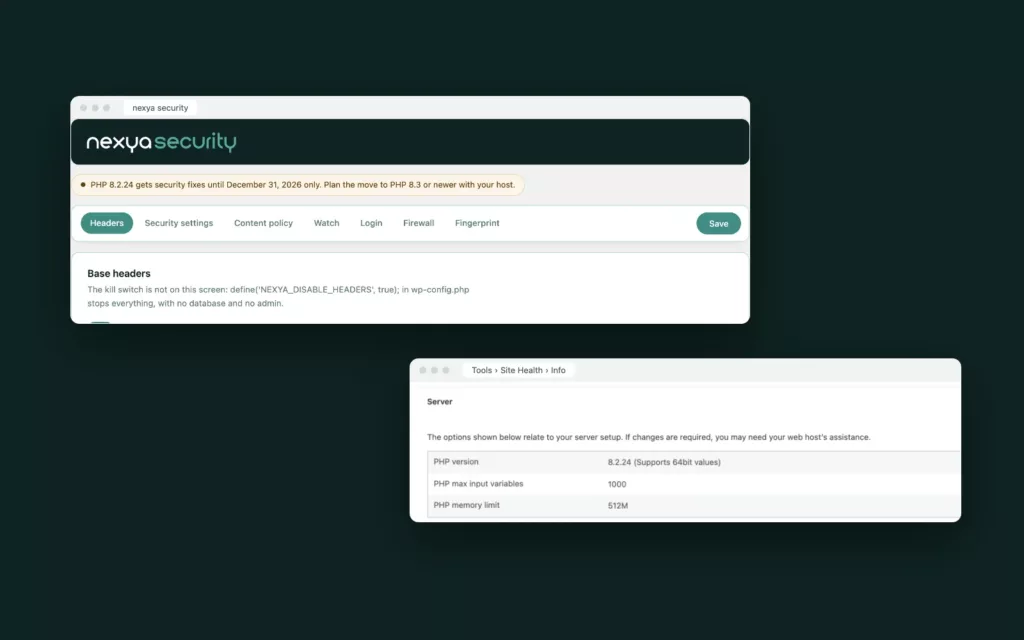
- The PHP version can be found under Tools › Site Health, and nexya displays it as an alert in the Security module when it reaches the end of its support lifecycle.
October 21 update: patches have been released. Following the alert on October 20, the PHP project has released its security updates. Its official advisory requests that you upgrade to the patched version of your branch without delay:
- PHP 8.2.35 for the 8.2 branch
- PHP 8.3.36 for the 8.3 branch
- PHP 8.4.27 for the 8.4 branch
- PHP 8.5.12 for the 8.5 branch
On shared or managed hosting, it is generally the host that installs these versions. Ask them to confirm that both patches are indeed in place on the server running your site: a published update is not necessarily already installed by all hosts.
On October 20, 2026, information about two critical vulnerabilities in PHP, the language that powers WordPress, leaked ahead of schedule. The PHP team released the patches the following day, Wednesday, October 21. If your site runs on WordPress, it runs on PHP: here is what we know, what you need to do, and how to check your version.
What we know about these vulnerabilities
- According to Sansec, the PHP security team rates these two vulnerabilities 9.2 out of 10 (CVSS v4.0), which is the “critical” level.
- According to watchTowr, these are remote code execution flaws: an attacker could cause their own code to run on the server. They are circulating under the nickname “PHP2Shell” and carry CVE references CVE-2026-109618 and CVE-2026-109619.
- According to Sansec, all web servers using PHP 5.4 or newer are reportedly affected.
- Patches are expected only for still-supported PHP 8 versions. PHP 5 and 7 have reached end-of-life and will not receive an official patch.
- As of October 21, watchTowr was not reporting any exploitation. However, Sansec expects mass attacks very shortly after the patches are released.
The patched versions are listed in the box at the top of this article.
Why a security plugin is not enough
Any WordPress plugin, regardless of what it is, is PHP code: it only executes after PHP has received and prepared the request. A vulnerability in PHP itself can therefore be exploited before this point. No firewall written in PHP can stand in the way, whether it is nexya’s, Wordfence’s, or another.
The only true protection against a PHP vulnerability is a patched PHP.
A firewall placed in front of the server, such as Cloudflare or your host’s firewall, sees the request before PHP. It can help while waiting for the patch as soon as the pattern of the attacks is known.
How to fix it
- Shared or managed hosting (Infomaniak, OVH, Hostpoint, etc.): it is the host that installs the patched versions. Ask them to confirm that they are in place on your site’s server.
- Site still on PHP 7.x, 8.0, or 8.1: there is no patch for these versions. Upgrade to PHP 8.3 or newer, usually from your host’s dashboard, in just a few clicks.
- Server you manage yourself: update PHP to the patched version of your branch: 8.2.35, 8.3.36, 8.4.27, or 8.5.12.
- Before changing versions, test on a copy of the site if possible, and verify that the theme and plugins are compatible.
- In the meantime, enable an upstream firewall where possible and monitor the server logs.
How to find your PHP version
In WordPress, open Tools › Site Health, Info tab, then expand the Server section. The “PHP version” line gives the exact version.
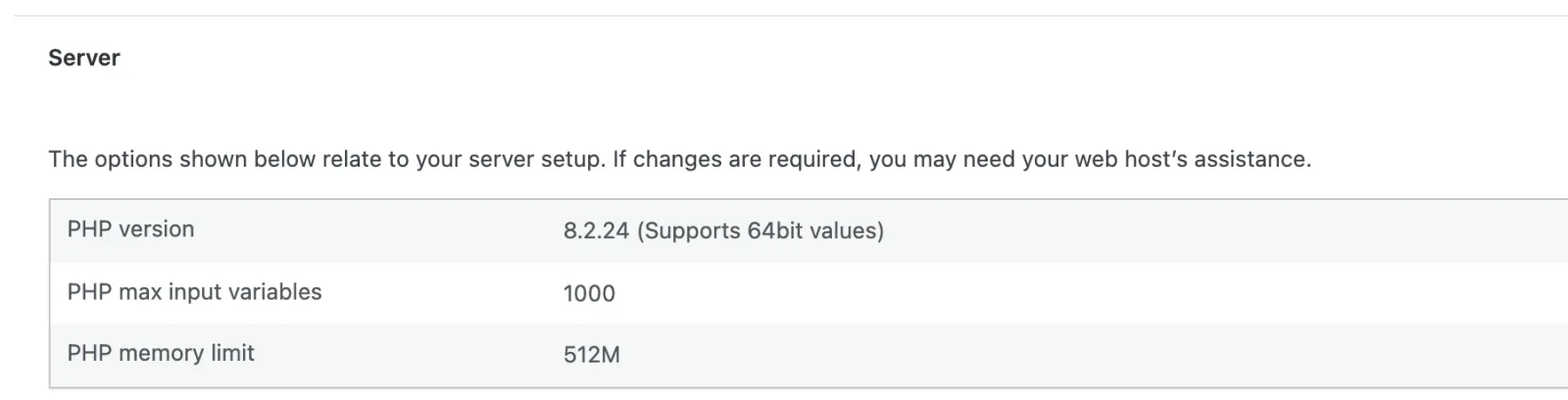
Your host’s control panel also indicates it, usually in the hosting or site configuration, often with a menu to change it.
What nexya provides: an alert in the Security module
Starting with nexya 1.5.10, the Security module displays a small alert at the top of its screen as soon as the server’s PHP version approaches the end of support. It turns amber when patches stop in less than six months, and red when they have already ended. It provides the installed version, the end date, and the version to upgrade to.
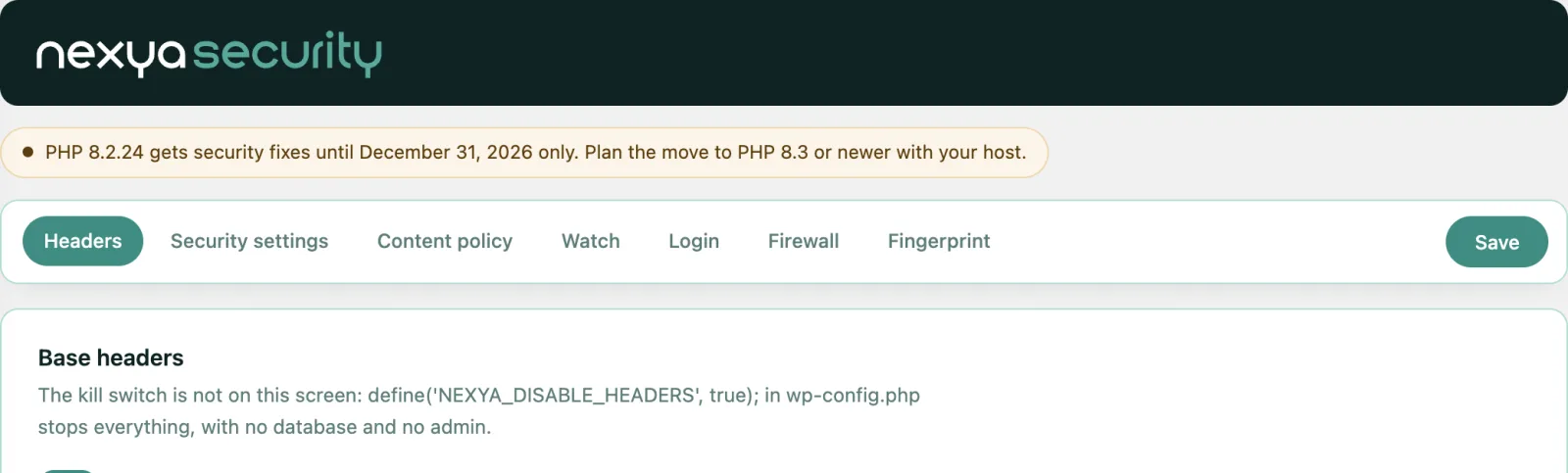
The alert is free and displays without any configuration. When the PHP version is up to date, it does not show up at all.
Dates to remember
Here is until when each PHP version receives security patches, according to the schedule published by PHP:
| PHP version | Security patches until |
|---|---|
| PHP 7.4 and older | ended (November 2022 for 7.4) |
| PHP 8.0 | November 26, 2023 — ended |
| PHP 8.1 | December 31, 2025 — ended |
| PHP 8.2 | December 31, 2026 |
| PHP 8.3 | December 31, 2027 |
| PHP 8.4 | December 31, 2028 |
| PHP 8.5 | December 31, 2029 |
What nexya does otherwise
The nexya Security module does not replace an up-to-date PHP, but it covers what is often missing on a WordPress site. Its lightweight firewall blocks common attacks before WordPress starts: SQL injection, injected scripts, known scanners. The monitoring feature compares your plugins daily against a public vulnerability database. And it spots sensitive files that the server exposes to everyone, such as .env, .git, or a forgotten backup, and then blocks them.
FAQ
Will my host automatically patch PHP?
On shared or managed hosting, yes for still-supported versions: the host handles installing PHP patches. If your site runs on PHP 7.x, 8.0, or 8.1, you also need to change versions, as these will not receive any further fixes.
Does the nexya firewall protect against these vulnerabilities?
No. It is written in PHP and only executes after PHP has prepared the request: a PHP vulnerability can be exploited beforehand. It protects against common attacks targeting WordPress and its plugins, not against a vulnerability in PHP itself.
How can I check which PHP version my site is using?
In WordPress, go to Tools › Site Health, Info tab, Server section. Your hosting control panel also displays this information. With nexya 1.5.10, the Security module displays an alert if your version is reaching the end of its support.
Can changing the PHP version break my site?
This can happen if your theme or a plugin is outdated. If possible, test on a staging copy of the site, update your theme and plugins before switching, and ensure you can easily roll back via your hosting control panel.
The modules in this post
Try nexya Pro free for 7 days
Every module, forms, newsletters and the page cache, on your site. No commitment.